Learning Outcome
By completing this activity, you will practice applying interpreter note-taking methods and refine your own note-taking system by comparing it with peers’ work and reflecting on specific improvements.
Instructions
1. Read the instructions carefully
This exercise will be completed on Padlet, an online collaboration board where you can upload your work and interact with your classmates’ posts.
Before you start, please read all instructions below so you understand the full flow of the activity.
2. Prepare your note-taking tools
- Choose your preferred note-taking setup: pen and paper, tablet, or digital device.
- Make sure you are ready to take clear photos or screenshots of your notes.
3. Open the Padlet activity
- On Padlet, you will see multiple columns, each containing one short paragraph in the original language.
- Each column represents a separate note-taking task.
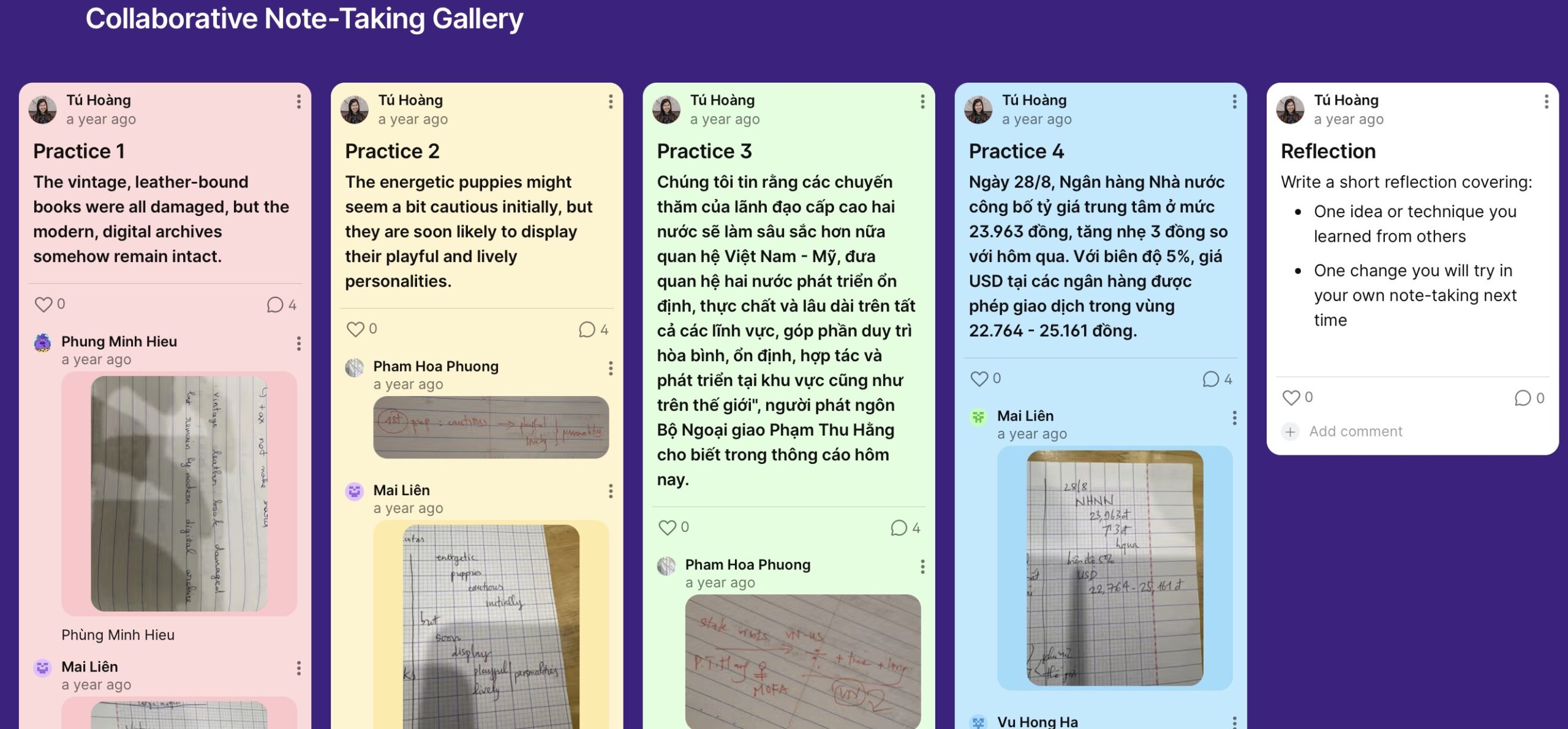
4. Take notes for each paragraph
- Go through the paragraphs one by one.
- For each paragraph:
- Read the paragraph carefully.
- Take notes using the interpreter note-taking method introduced in the previous lessons.
5. Upload your notes
- Take a photo or screenshot of your handwritten or digital notes.
- Upload the image to the corresponding column of the original paragraph on Padlet.
6. Review peers’ notes and give feedback
- Review at least two peers’ note-taking posts.
- Leave comments focusing on:
- Clarity and structure of the notes
- Use of symbols and abbreviations
- What helped or hindered your comprehension as a reader
7. Share your reflection
- Go to the final reflection column on Padlet.
- Write a short reflection covering:
- One idea or technique you learned from others
- One change you will try in your own note-taking next time
What You Will Produce
- 4 note-taking samples (one for each paragraph) uploaded to Padlet
- 2 peer feedback comments on Padlet
- 1 short written reflection in the final Padlet column
Start the activity
Click the button below to access Padlet and begin.
Notes for Evaluator
Related Topic: Collaborative learning
ISTE Standards Addressed
- ISTE Student Standard 7: Global Collaborator
Learners use a shared digital workspace to compare professional practices, exchange feedback, and learn from peer approaches.
- ISTE Student Standard 1: Empowered Learner
Learners apply prior instruction independently, reflect on peer input, and make intentional decisions to improve their own skill performance.
Additional Notes
Context: This activity is placed after learners have completed the theoretical lessons on interpreter note-taking methods. It focuses on application, practice, and refinement of the technique.
Learning environment: The course and platform are designed for asynchronous learning. Learners may join at different times, and the note-taking gallery on Padlet builds up gradually as more learners participate.
Padlet used for demonstration: The Padlet link included in this activity was originally used in a live online class. In that class, learners uploaded their note-taking samples, while feedback and reflection were conducted verbally. As a result, the Padlet currently shows learner samples without written comments or reflections. It is included here to demonstrate how the same Padlet-based activity can function in an asynchronous format.